
How Should Sign-Up and Login Be Planned in a Mobile App?

Mobile app sign-up and login should be planned together with user experience, data security, profile management, user roles, verification methods, admin panel requirements, and analytics.
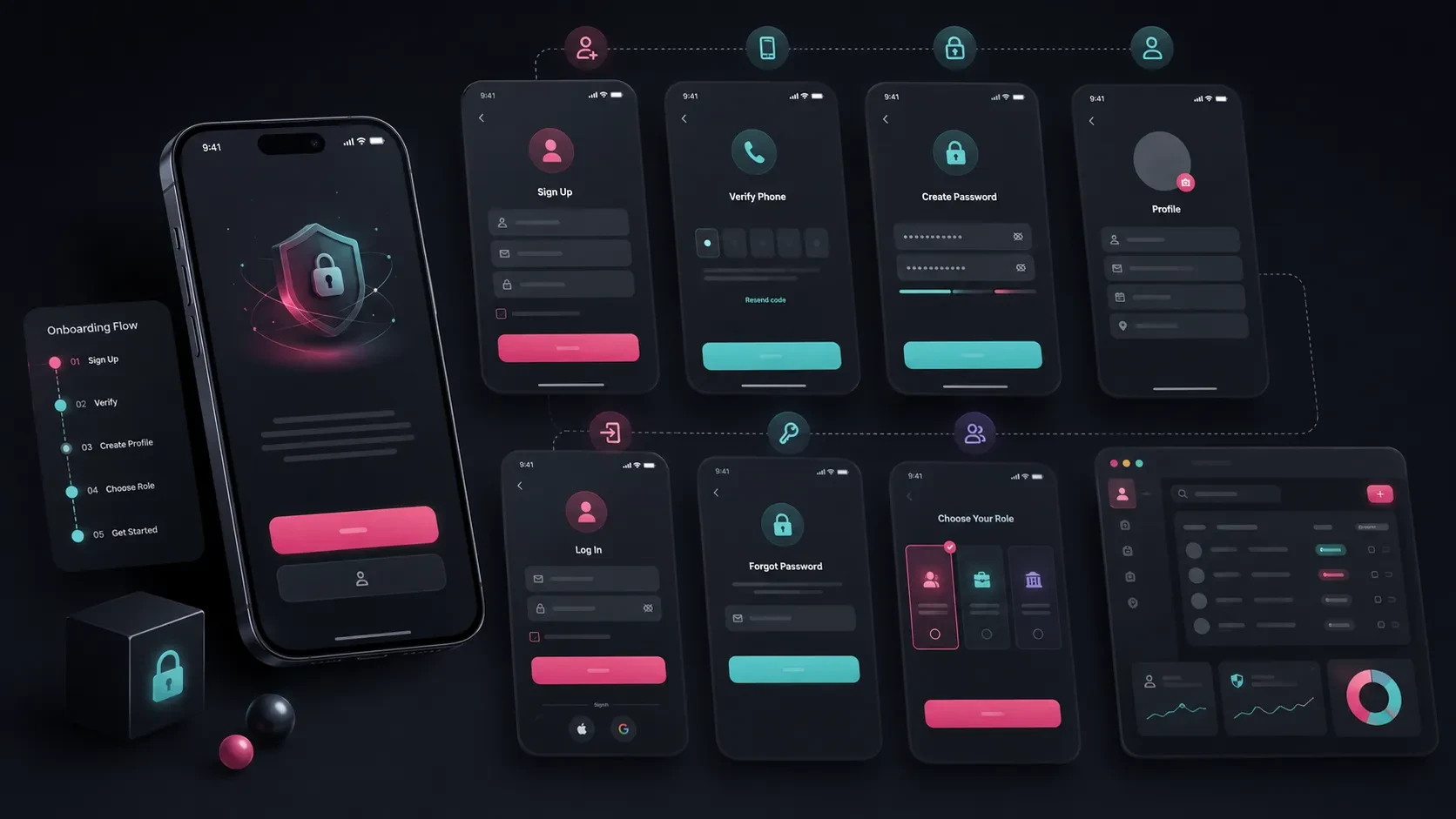
Sign-up and login are among the first interactions users have with a mobile application.
Users create an account, sign in, complete their profile, and continue using the product through an experience connected to their personal information.
When this process is planned well, users can start using the application comfortably, manage their accounts securely, and access the information they need without unnecessary friction.
For the business, a structured membership system also makes user records, profiles, roles, permissions, and behavioral data easier to manage.
Sign-up and login involve much more than a registration form.
Email or phone verification, social login, password reset, profile fields, user roles, privacy permissions, admin panel requirements, and analytics should all be considered within the same product flow.
The Membership Model Should Match the Purpose of the App
Not every mobile application needs the same membership model.
In some products, a user account is at the center of the experience. In others, users may explore basic content first and only be asked to create an account when they want to perform a specific action.
When defining the membership model, consider questions such as:
Can users explore the app without creating an account?
At what stage should account creation be requested?
What information should the user profile contain?
Will users sign in with a phone number, email address, or social account?
Will the application include different user roles?
Which features become available after registration?
How will user information appear in the admin panel?
For example, a reservation application may require an account when the user wants to book an appointment.
In an education app, membership can be used to manage lesson progress, completed content, and access permissions.
In an e-commerce application, order history, delivery addresses, favorites, and campaigns can be connected to the customer account.
When the membership model is planned around the actual purpose of the product, the authentication experience becomes easier to understand.
Keep the Sign-Up and Login Flow Simple
Registration and login screens should help users enter the product with as little unnecessary friction as possible.
For this reason, the information requested during the first step should be selected carefully.
Basic registration fields may include:
Full Name
Email
Phone Number
Password
Privacy and consent approvals
The primary identifier may vary between projects.
For some applications, the phone number may be the most practical way to identify a user. For others, email may be more appropriate.
Corporate or B2B applications may also require additional information such as:
Company name
Job title
Customer number
Dealer code
Department
It is useful to separate information that is genuinely required during registration from information that can be completed later in the profile.
Instead of asking users for a large amount of information before they have even entered the application, the product can allow them to create an account quickly and complete additional profile details afterward.
The login screen should also clearly communicate which credentials can be used.
Email or phone number, password, social login options, and password reset should be easy to find and understand.
Profile Fields Should Be Planned Around Real Needs
The user profile supports both personalization and the operational side of the application.
The information stored in a profile should therefore be determined according to the product’s service model.
Profile information may include:
Full Name
Phone Number
Email
Profile Photo
Company Information
Address Information
Interests
Notification Preferences
Billing Information
Membership Plan
Security Settings
The right fields vary significantly depending on the application.
In a healthcare or appointment-based product, profile information may support the booking process.
In an education application, user level, interests, and completed content may be more relevant.
In a B2B customer application, company information, authorized contacts, and user roles may become more important.
Profile planning should also be connected with the admin panel.
Internal teams should be able to understand which information belongs to each user and manage user records when necessary.
Password Reset and Account Security Should Be Core Flows
For applications with user accounts, password recovery and account security are essential parts of the experience.
If users lose access to their accounts, they should be able to recover access through a clear and secure process.
A password reset flow may include:
Entering an email address or phone number
Receiving a verification code or link
Creating a new password
Seeing a success confirmation
Returning to the login screen
Security requirements may also include:
Password rules
Session duration
Device management
Verification steps
Additional confirmation for sensitive actions
Session termination
Login attempt monitoring
Account security becomes particularly important when the application handles payments, personal information, appointments, documents, files, or customer-specific data.
User data, permissions, and session information should be managed securely through the backend.
For a more detailed look at the infrastructure behind these processes, you can read our guide on why a mobile app needs a backend.
User Roles and Permissions Should Be Defined Clearly
Some mobile applications have only one type of user.
Others may include customers, administrators, instructors, dealers, sellers, service teams, field employees, or other distinct roles.
When planning user roles, define:
Which user types will exist?
Which screens can each role access?
Which actions can each role perform?
What permissions will administrators have?
Can roles be changed from the admin panel?
Will new users require approval?
Can one account have multiple roles?
Consider an education application.
Students may access lessons and assignments, instructors may manage content and coursework, while administrators manage users and reporting.
In a dealer application, dealers may create orders and review their own information while the central team manages all orders, customers, and price lists.
Defining permissions early creates a more structured product architecture and makes it easier to introduce additional user types later.
Users Should Be Manageable Through an Admin Panel
The membership and login system should also support the operational needs of the company.
User registrations, profiles, roles, verification statuses, notification preferences, and activity history can be monitored through an admin panel.
Relevant modules may include:
User List
User Detail Page
Roles and Permissions
Profile Information
Verification Status
Subscription or Package Information
User Activity
Notification History
Account Status
Notes and Tags
This structure allows teams to manage users more efficiently.
For customer service, sales, operations, and support teams, quick access to the relevant user information can make daily work significantly easier.
The admin panel is therefore an important part of the mobile product rather than a completely separate system.
When the membership structure is defined, the screens and controls required by the internal team should be planned at the same time.
Privacy and Consent Should Be Part of the Registration Experience
Applications that collect personal information should clearly plan which permissions and consents are required during registration.
Depending on the product and market, users may need to review or approve areas such as:
Privacy policy
Terms of service
Personal data processing information
Marketing communication preferences
Notification permissions
Optional consent fields
Required approvals and optional marketing permissions should be visually distinguishable.
Users should be able to understand what they are agreeing to and which permissions are necessary to use the product.
Privacy planning should also consider what happens after registration.
Users may need access to their consent preferences, profile data, account settings, and account deletion options.
Keeping these controls accessible creates a more transparent account experience.
Error States Should Help Users Continue
Registration and login flows naturally include error scenarios.
The interface should explain what happened and provide a clear next step.
Common examples include:
Invalid email address
Incorrect phone number
Incorrect password
Verification code expired
Account already exists
Account not found
Too many login attempts
Social login cancelled
Network connection error
Messages should be written in language users can understand rather than exposing technical error codes.
For example:
“Your email address or password is incorrect. Please check your details and try again.”
is more useful than displaying an internal authentication error.
When possible, the screen should also provide the relevant recovery action, such as resetting the password or requesting a new verification code.
The First Login Experience Should Be Planned
Registration is complete when the account is created, but the user’s first experience inside the product is equally important.
After the first login, users may need to:
Complete their profile
Select preferences
Enable notifications
Add an address
Choose interests
Select a membership plan
Complete onboarding
Perform the product’s primary action
The number of steps should reflect what is genuinely necessary.
A user should not be forced through a long setup process before understanding the value of the application.
For example, if the main value of an appointment app is booking a service, the product should help users reach available appointments quickly rather than requiring them to complete every optional profile field first.
Profile enrichment can continue naturally over time.
Registration and Login Behavior Should Be Measured
Tracking the authentication flow helps teams understand where users progress comfortably and where friction appears.
Useful events and metrics may include:
Registration screen views
Registration starts
Registration completions
Login attempts
Successful logins
Password reset requests
Phone verification rate
Email verification rate
Profile completion rate
Social login usage
Active users
This data makes it possible to improve the membership experience after launch.
For example, if a large number of users begin registration but leave during verification, the verification step, messaging, or technical delivery process can be reviewed.
If profile completion remains low, the team can simplify the profile flow or reconsider when information is requested.
Authentication analytics can also help teams compare different registration methods.
If users complete social login significantly more often than manual registration, that behavior can influence future product decisions.
Account Management Should Continue After Registration
Membership does not end after the first successful login.
Users should be able to manage their accounts throughout the lifecycle of the product.
Depending on the application, account management may include:
Updating profile information
Changing password
Changing phone number or email
Managing notification preferences
Viewing connected devices
Logging out of other sessions
Managing subscription information
Reviewing privacy preferences
Deactivating an account
Deleting an account
These flows should be easy to find within account or profile settings.
When important account controls are hidden or require support intervention, the experience becomes harder to manage for both the user and the company.
A clear self-service structure reduces unnecessary support requests while giving users more control over their accounts.
Codezone’s Approach
At Codezone, we plan mobile app membership and login flows together with user experience, backend architecture, data structure, security, admin panel requirements, and analytics.
We begin by understanding the purpose of the application, user types, registration model, profile requirements, and verification methods.
From there, we structure the mobile screens, API requirements, user data model, permission logic, admin panel, and measurement plan as parts of the same digital product.
This approach creates a membership experience that is easy for users to begin, practical for teams to manage, and flexible enough to evolve as the product grows.
Conclusion
Sign-up and login in a mobile application should be planned together with user experience, account security, profile management, user roles, verification methods, admin operations, and analytics.
A simple registration flow, clear login experience, secure account structure, appropriate profile fields, and well-defined permission model create a stronger foundation for the product.
When these systems work together, users can start using the application more comfortably and manage their accounts with confidence.
At the same time, the company gains a clearer structure for managing users, data, permissions, and operational processes.
Frequently Asked Questions
When does a mobile app need a membership system?
A membership system is useful when the application includes personal profiles, order history, appointments, payments, notifications, favorites, learning progress, subscriptions, or other user-specific data.
Should a mobile app use phone number login or email login?
The right option depends on the target audience and business model. Phone verification can provide a fast and practical experience, while email may be particularly suitable for corporate, B2B, and content-oriented applications.
Is social login useful in a mobile app?
Yes. Sign in with Apple or Google can reduce the effort required to create an account and help users enter the application more quickly.
Why are user roles important?
User roles determine which screens, information, and actions different types of users can access. They become particularly important in applications with roles such as customers, administrators, dealers, instructors, sellers, or team members.
What should be measured in the sign-up and login flow?
Registration starts and completions, login attempts, successful logins, verification rates, password reset requests, profile completion, social login usage, and active users can all provide useful insights.
Social Login and Verification Options Should Be Evaluated
Social login and phone verification can make account creation more convenient.
Users may be able to start using the application more quickly through Apple, Google, or similar identity providers.
Phone verification can also be particularly practical for products in which phone numbers are already connected to appointments, orders, memberships, or customer communication.
Possible authentication and verification methods include:
Email login
Phone number login
Sign in with Apple
Sign in with Google
SMS verification code
Email verification link
One-time login code
The right options should be selected according to the target audience and the product model.
For an application with a strong iOS user base, Sign in with Apple may provide a convenient option.
For applications where appointments, orders, or memberships are already managed through phone numbers, SMS verification may fit the overall customer journey more naturally.
Verification also contributes to account quality.
It can reduce invalid registrations, keep user records more consistent, and provide an additional layer of control for sensitive actions.