
Which Modules Should Be Planned When Building an Admin Panel?

An admin panel brings users, content, requests, orders, reporting, integrations, and system settings into one central workspace. Planning the right modules from the beginning creates a more manageable and scalable digital product.
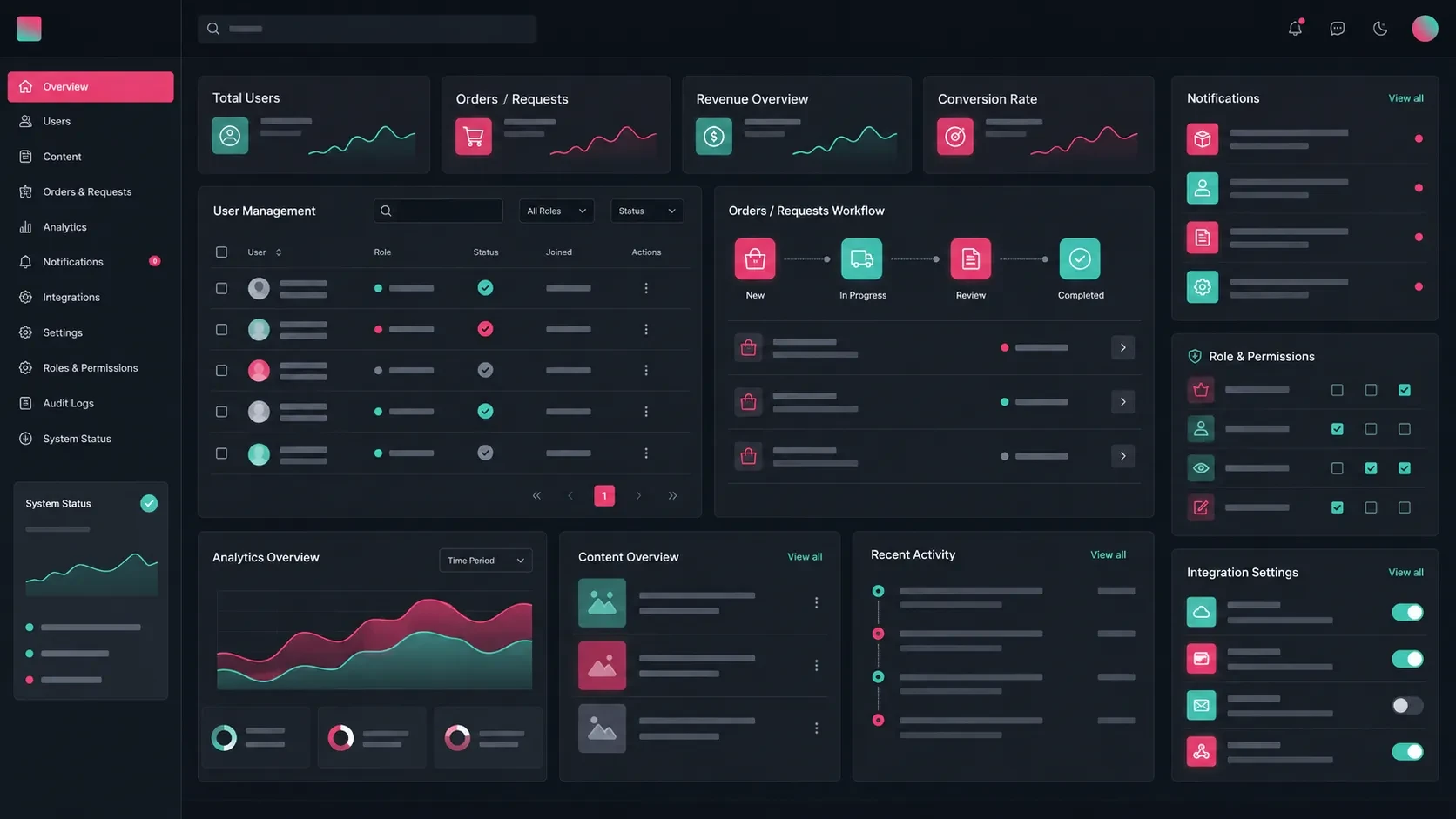
An admin panel is the central workspace where a company manages the operational side of a digital product.
A website, mobile application, e-commerce platform, customer portal, or custom software product may provide customer-facing experiences, while the admin panel gives internal teams the tools they need to manage the system behind those experiences.
Through a well-structured panel, teams can manage users, content, orders, requests, notifications, reports, integrations, and system settings from one place.
For this reason, an admin panel should not be treated simply as an additional technical interface.
It should be planned around business workflows, team responsibilities, data structure, permissions, and the long-term development of the product.
User and Role Management
User management is one of the core modules of many admin panels.
Depending on the product, the system may include customers, administrators, team members, dealers, sellers, instructors, operations users, or other account types.
A user management module may include:
User list
User detail pages
Roles and permissions
Account status
Profile information
Registration date
Last login information
Tags and internal notes
User activity
Account approval status
Role management becomes especially important when different users need access to different parts of the system.
For example, a customer portal may include customer, company representative, and administrator roles.
An education platform may have students, instructors, and administrators.
In a dealer platform, dealers may only see their own orders while the central team can access all dealer activity.
For this reason, permissions should be defined according to real responsibilities.
The project should clearly establish what each role can view, create, edit, approve, export, or delete.
Content and Data Management
Many digital products require content or structured data to be managed continuously.
The type of information depends on the product.
A corporate website may require page and article management. An e-commerce platform may need products and categories. A mobile application may contain dynamic in-app content, while a customer portal may need documents and announcements.
A content and data management module may include:
Page management
Blog or article management
Product management
Category management
Image and media management
Announcement management
Document management
Frequently asked questions
Multilingual fields
Publishing status
The goal is to allow company teams to update everyday content without requiring development support for each change.
For example, a team may add a new service page, update a product description, upload a campaign image, or publish an announcement directly through the panel.
The underlying data model is equally important.
Teams should define which fields are editable, which content can be reused across different pages, and how information relates to different parts of the product.
Request, Order, and Form Management
Admin panels often act as the operational center for actions submitted by users.
Depending on the product, this may include:
Form submissions
Quote requests
Orders
Reservations
Appointment requests
Support tickets
Request status
Priority level
Assigned team member
Notes
Activity history
For a corporate website, for example, quote requests can appear directly in the panel.
The team can see which service the inquiry relates to, where the lead came from, who is responsible for it, and what stage it has reached.
In e-commerce projects, order management usually requires a broader structure.
Teams may need to see payment status, shipping information, invoice data, purchased products, customer notes, cancellations, and returns within the same workflow.
Bringing these actions into one environment makes operational work more visible and easier to follow.
Dashboard and Reporting
The dashboard is usually the first screen teams see when they enter the admin panel.
Its role is to provide a useful overview of the product and highlight information that may require attention.
Depending on the system, the dashboard may display:
Total users
New registrations
Incoming requests
Open support tickets
Number of orders
Sales volume
Form conversions
Active subscriptions
Recent activity
Critical alerts
The dashboard should focus on information that supports daily decisions rather than displaying metrics simply because they are available.
Reporting can provide a deeper level of analysis.
Users may need to filter information by date, category, customer type, product, team, or operational status.
Reporting modules can help answer questions such as:
Which pages generate the most inquiries?
Which products generate the most sales?
Which customer segments are most active?
Which support topics occur most frequently?
How has operational volume changed over time?
The first version of an admin panel may only require a focused dashboard and basic reporting.
More advanced filters, exports, visualizations, and custom reports can be introduced as the product grows.
Notification and Communication Modules
Many digital products need to communicate with users when important events occur.
The admin panel can provide a central environment for managing these communications.
A notification module may include:
Creating announcements
Selecting user segments
Sending email notifications
Sending SMS
Sending push notifications
Creating in-portal notifications
Notification history
Scheduled notifications
Template management
For example, a mobile application may send a campaign notification to a specific group of users.
A customer portal may notify a customer when a new document is uploaded.
An e-commerce platform may automatically send an update when an order status changes.
The notification structure should define what triggers a message, who receives it, which channel is used, and whether communication is automatic or manually initiated by the team.
This helps create more consistent customer communication while reducing repetitive manual work.
Integration and System Settings
Digital products often need to work together with other systems already used by the company.
These may include:
Payment infrastructure
Shipping services
CRM platforms
ERP systems
Email providers
SMS providers
Analytics and conversion tracking
API keys
Webhooks
External data synchronization
Some settings may remain accessible only to technical administrators.
Others can be made manageable by authorized company users.
For example, teams may be allowed to edit email templates, shipping options, campaign rules, or notification content directly from the panel without changing the application code.
Integrations should ideally be identified during project planning.
The team should understand where data originates, which system is the primary source, where information is sent, and which events trigger updates.
For a more detailed look at how different systems can work together, you can read our guide on what API integration is and what it offers companies.
Permissions, Security, and Activity History
Admin panels often provide access to sensitive and business-critical actions.
Users may be able to delete accounts, change prices, update order statuses, view payment-related information, assign permissions, or publish content.
These actions require a clear security and authorization structure.
Relevant capabilities may include:
Role-based access
Module-level permissions
Activity history
Login records
Password reset
Two-factor authentication
Approval for critical actions
Device or IP monitoring
Data export permissions
Account deactivation
Different teams should only have access to the areas relevant to their responsibilities.
For example, the content team may manage articles, while the finance team can access payment records. An administrator may have broader access to system configuration.
Activity logs are also important.
The system should be able to answer questions such as:
Who changed this record?
When was the change made?
Which user exported this data?
Who changed the account permissions?
Who approved this transaction?
This creates a more transparent and manageable operational environment.
Plan the First Version Around Core Operations
It is rarely necessary to include every possible admin panel module in the first release.
Trying to build the complete long-term vision immediately can make the initial scope unnecessarily large.
A stronger approach is to begin with the modules that support the most important daily operations.
The first release might include:
User management
Roles and permissions
Basic content management
Request or order tracking
Dashboard
Notification history
System settings
Basic reporting
Later versions can introduce:
Advanced reporting
Additional integrations
Automation
Data exports
Multilingual management
Advanced permissions
Campaign modules
AI-assisted features
When defining the first release, ask:
What will the team use the panel for from day one?
Which modules are essential for operations?
Which features can move to a later phase?
Which data needs to be monitored regularly?
Which integrations are required at launch?
Which teams will use the panel?
This creates a more controlled development process and allows later decisions to be informed by real usage.
For a broader framework for planning the first scope of a software product, you can read our beginner’s guide for companies looking to build a web application.
Codezone’s Approach
At Codezone, we plan admin panel projects by bringing user roles, data structure, workflows, integrations, security, reporting, and future product development together.
We first evaluate the company’s existing operations, the actions teams perform regularly, different user types, and critical data flows.
From there, we define the first-release scope, module structure, interface flows, backend architecture, and integration requirements.
This approach turns the admin panel into a practical operating environment that helps teams manage everyday work, makes business processes more visible, and creates a foundation for the digital product to evolve over time.
Conclusion
When building an admin panel, user management, content management, requests and orders, dashboards, reporting, notifications, integrations, permissions, and security should be considered as connected parts of the same system.
A well-planned panel helps teams manage everyday operations more effectively.
When users, content, requests, orders, and reports are brought together within one structured environment, teams gain greater visibility and control over the product.
The admin panel is one of the core systems supporting a digital product behind the scenes.
Defining its modules, user roles, permissions, and development roadmap early creates a stronger foundation for long-term product management.
Frequently Asked Questions
What is an admin panel?
An admin panel is a web-based interface that allows company teams to manage users, content, requests, orders, reports, integrations, and system settings from a central environment.
Which modules should an admin panel include?
Common modules include user management, roles and permissions, content management, request or order tracking, dashboards, reporting, notifications, integrations, and system settings.
Does every digital product need an admin panel?
Not necessarily. However, an admin panel becomes particularly valuable when the product requires ongoing management of users, content, orders, requests, documents, payments, notifications, or reporting.
Can an admin panel work together with a mobile application?
Yes. Users, content, notifications, orders, appointments, and other application data can be managed through the admin panel while the mobile application provides the user-facing experience.
How comprehensive should the first version of an admin panel be?
The first version should focus on the modules required for core daily operations. Advanced reporting, automation, additional integrations, and more specialized functionality can be introduced in later phases.