
How to Structure a Quote Request Form on a Corporate Website

A well-designed quote request form helps visitors explain their needs clearly, allows teams to evaluate inquiries more effectively, and creates a more structured starting point for the sales process.
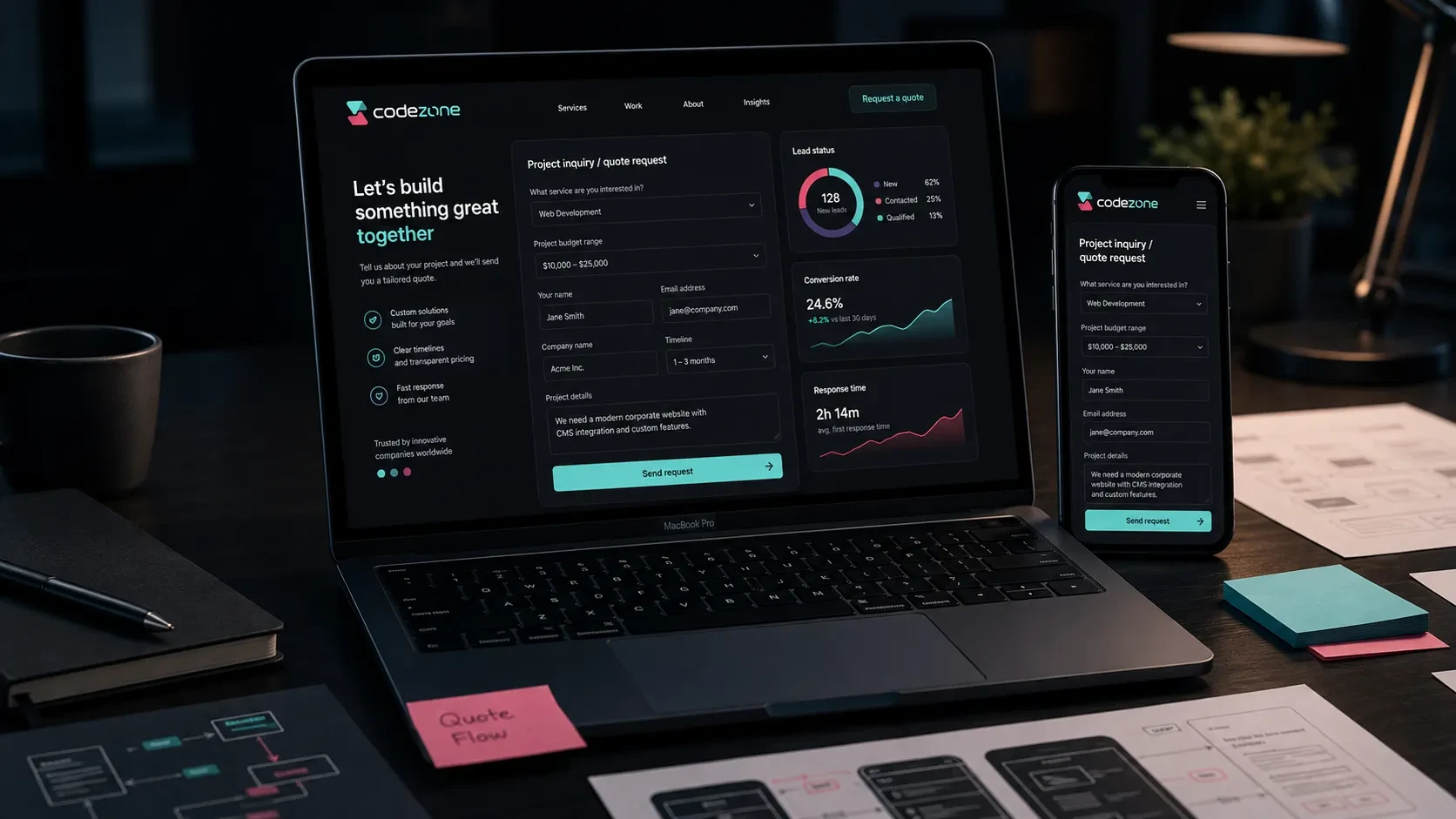
A quote request form is one of the most important points of direct interaction between a visitor and a company on a corporate website.
Visitors explore services, learn about the company, evaluate trust signals, and eventually reach a point where they want to describe their project or request more information.
For this reason, a quote request form should be more than a collection of contact fields.
It should make it easy for visitors to explain what they need while giving the company enough information to understand the project, evaluate the opportunity, and begin the sales process with better context.
A well-structured form supports both user experience and lead quality.
Define the Purpose of the Form
Before deciding which fields should appear, the purpose of the form should be clear.
Not every corporate website needs to collect the same type of inquiry.
Some companies mainly need general contact requests. Others need detailed project inquiries, service applications, or structured information that allows the sales team to qualify an opportunity before the first meeting.
A quote request form may be designed to:
Receive new project inquiries
Collect corporate website requests
Identify the service a visitor needs
Understand the expected budget range
Learn more about project requirements
Collect contact information
Give the sales team useful context
Direct potential customers toward the right service
Once the goal is clear, the required fields become easier to define.
A short form may be enough for an initial conversation. If the company needs more information before evaluating a project, fields such as project type, budget range, and project details can be added.
Choose Form Fields Carefully
One of the most important decisions is how much information to request.
The form should be simple enough to complete comfortably while still collecting enough information for the team to understand the inquiry.
A corporate website quote request form may include:
Full Name
Email
Phone Number
Company Name
Project Type
Budget Range
Project Details
Preferred Communication Channel
This provides a useful foundation for the first contact.
Project type and budget range help the team understand the general scope, while the project details field gives visitors space to describe their requirements in their own words.
For a shorter form, the structure could be reduced to:
Full Name
Email
Project Type
Project Details
This can work well when the priority is to make the initial contact as easy as possible.
The right structure depends on how much information the team actually needs before starting a conversation.
Project Type Helps Guide the Visitor
A project type field helps visitors describe what they are looking for without having to explain everything from the beginning.
It also helps the team categorize incoming inquiries more consistently.
Possible options may include:
Corporate Website
E-Commerce
Mobile Application
Digital Product
Admin Panel
Website Redesign
Other
This selection also acts as a small piece of guidance for the person completing the form.
Instead of starting with an entirely open question, visitors can first select the option that feels closest to their needs and then provide additional details.
For a company like Codezone that offers several digital services, this field also makes it easier to organize and evaluate inquiries according to service category.
Position the Budget Range Carefully
Budget can be valuable information in a project inquiry, but the field should be presented clearly and with context.
It helps the team understand the visitor’s expectations and evaluate what kind of scope may be realistic.
A budget field could include ranges such as:
TRY 50,000 – 100,000
TRY 100,000 – 250,000
TRY 250,000 – 500,000
TRY 500,000+
Not Defined Yet
A short explanation can also be added next to the field:
“Your budget range helps us evaluate the project scope more accurately.”
This makes the reason for asking more transparent.
The field then becomes part of the project-planning process rather than feeling like an unnecessary barrier before contact.
Guide the Project Details Field
The open-text project details field is one of the most valuable parts of the form.
However, many visitors may not immediately know what information they should provide.
A short placeholder or supporting description can make this easier.
For example:
“Tell us about the purpose of your project, the pages or features you need, your existing website if you have one, and your target launch date.”
This helps the visitor write a more useful description while giving the project team better information to work with.
Visitors may be encouraged to mention:
The purpose of the project
Their existing website
The type of service they need
Required pages or modules
Current content readiness
Reference websites
Target launch date
Special integration requirements
Receiving this information at the beginning can make the first evaluation and proposal process more efficient.
Use a Clear and Inviting CTA
The submit button is a small but important part of the form experience.
Its wording should make the action clear while remaining consistent with the tone of the brand.
Possible CTA labels include:
Tell Us About Your Project
Request a Quote
Submit Your Request
Request a Meeting
Send Project Details
For Codezone, “Tell Us About Your Project” works particularly well.
It creates a more consultative tone and makes the form feel like the beginning of a conversation rather than simply a request for pricing.
The heading above the form can support the same approach.
For example:
Let’s evaluate your project together.
or:
Let’s plan your website together.
This helps visitors understand what kind of interaction will follow after submitting the form.
Add a Short Trust Message Next to the Form
A quote request form asks visitors to share personal and project-related information.
A short explanation next to the form can make the process feel more transparent and reassuring.
For example:
“We use your information only to evaluate your project and get back to you.”
Another option could be:
“We’ll review your project and get back to you with a clear roadmap.”
Supporting information can also include:
Expected response time
How the company will contact the visitor
How submitted information will be handled
What will be discussed during the first meeting
This area should remain concise.
The goal is to answer the visitor’s immediate questions without adding another long section to the form.
Place the Form Naturally Within the Website Journey
If the quote request form is available only on the contact page, some visitors may leave the website before reaching it.
The website should provide natural paths toward the form from relevant pages.
These may include:
Homepage hero section
After service overview sections
At the end of service pages
Within relevant blog articles
After pricing or process explanations
Between sections of landing pages
Footer
The same CTA does not need to appear with the same intensity everywhere.
The wording should fit the context.
For example, a service page may use “Tell Us About Your Project”, while an educational article may use a softer transition such as “Explore Our Corporate Website Services.”
For a broader look at how a corporate website can turn visitors into qualified inquiries, you can read our guide on how to generate more customer inquiries through a corporate website.
Design the Mobile Form Experience Carefully
A significant share of corporate website inquiries may come from mobile devices.
The form should therefore be designed specifically for smaller screens rather than simply adapting the desktop version.
Important considerations include:
Comfortable field heights
Correct mobile keyboard types
Numeric keyboard for phone fields
Email keyboard for email fields
Easy-to-reach submit button
Clear validation messages
A visible confirmation after submission
Single-column form layout
Visitors should always be able to understand which field they are completing and what they need to do next.
This becomes particularly important for landing pages receiving paid advertising traffic.
When someone arrives from an advertisement and is ready to make an inquiry, unnecessary friction in the mobile form can directly affect lead performance.
Make the Success Message and Next Step Clear
The user journey should not end with the submit button.
After the form is successfully submitted, the visitor should receive a clear confirmation.
For example:
“Your request has been received. We’ll review your project and get back to you with a clear roadmap.”
This confirms that the submission was successful and explains what will happen next.
The success screen may also include:
Expected response time
A reminder to check email
A link to a relevant service page
Links to related articles
An option to schedule a meeting
The goal is to complete the interaction instead of leaving the visitor with a generic “Form submitted” message.
Plan Form Notifications and CRM Workflows
A quote request form also starts an internal workflow.
The experience after submission should therefore be planned for both the visitor and the company team.
Possible actions include:
Send an email notification to the team
Send an automatic confirmation email to the visitor
Create the lead in the CRM
Tag the inquiry according to project type
Record the lead source
Display the submission in the admin panel
Create a task for the sales team
This creates a more structured lead-management process.
The team can see where each inquiry came from, which service it relates to, and what stage of the sales process it has reached.
It also reduces the risk of inquiries being lost across email inboxes or handled inconsistently.
Set Up Conversion Tracking
The quote request form is one of the most important conversion points on a corporate website.
Tracking it makes it possible to understand which pages, campaigns, and traffic sources generate meaningful inquiries.
Useful events may include:
Form views
Form starts
Form submissions
CTA clicks
Service page to form transitions
Blog article to form transitions
Advertising campaign conversions
WhatsApp clicks
Phone clicks
These events can be measured through tools such as GA4, Google Tag Manager, advertising platforms, or CRM integrations.
The resulting data helps identify opportunities for improvement.
If one service page consistently generates more inquiries, its structure can be studied and applied elsewhere.
If a particular CTA placement performs well, similar patterns can be tested on other pages.
Measurement turns the form into an experience that can continue to improve after launch.
Codezone’s Approach
At Codezone, we plan quote request forms as part of the complete customer inquiry journey.
Form fields, project type selection, CTA placement, service pages, transitions from editorial content, confirmation states, notification flows, CRM connections, and conversion tracking are considered together.
This structure makes it easier for visitors to describe what they need while giving the team better information for evaluating each opportunity.
The result is a more organized beginning to both the communication and sales process.
Conclusion
A quote request form is one of the most important conversion areas on a corporate website.
Its purpose, fields, CTA wording, supporting message, mobile experience, success state, internal notifications, CRM workflow, and conversion tracking should all be planned together.
A well-designed form makes it easier for visitors to explain their needs.
For the company, it creates a clearer way to evaluate incoming opportunities, direct them toward the right service, and begin the sales process with stronger context.
The quote request form is therefore not only a visible website component. It is also an important part of the company’s digital sales and communication workflow.
Frequently Asked Questions
Which fields should a corporate website quote request form include?
Full name, email, phone number, company name, project type, budget range, and project details can all be included depending on how much information the company needs during the initial contact.
Should a quote request form be short or detailed?
It depends on the goal. A shorter form can make initial contact easier, while a more detailed form with project type, budget, and project information can help collect more qualified inquiries.
Should the form ask for a budget range?
A budget range can help the team evaluate the expected project scope more accurately. Adding a short explanation about why the information is requested can make the field clearer for visitors.
Where should a quote request form be promoted?
The homepage, service pages, landing pages, blog articles, and contact page can all provide paths toward the quote request form.
How can quote request form conversions be tracked?
Form submissions, CTA clicks, transitions from service pages or articles, advertising conversions, WhatsApp interactions, and phone clicks can be tracked through tools such as GA4, Google Tag Manager, and CRM integrations.