
What Is a Customer Portal? How Can Companies Use It?

A customer portal brings documents, requests, payments, appointments, support processes, and customer communication into a single digital environment.
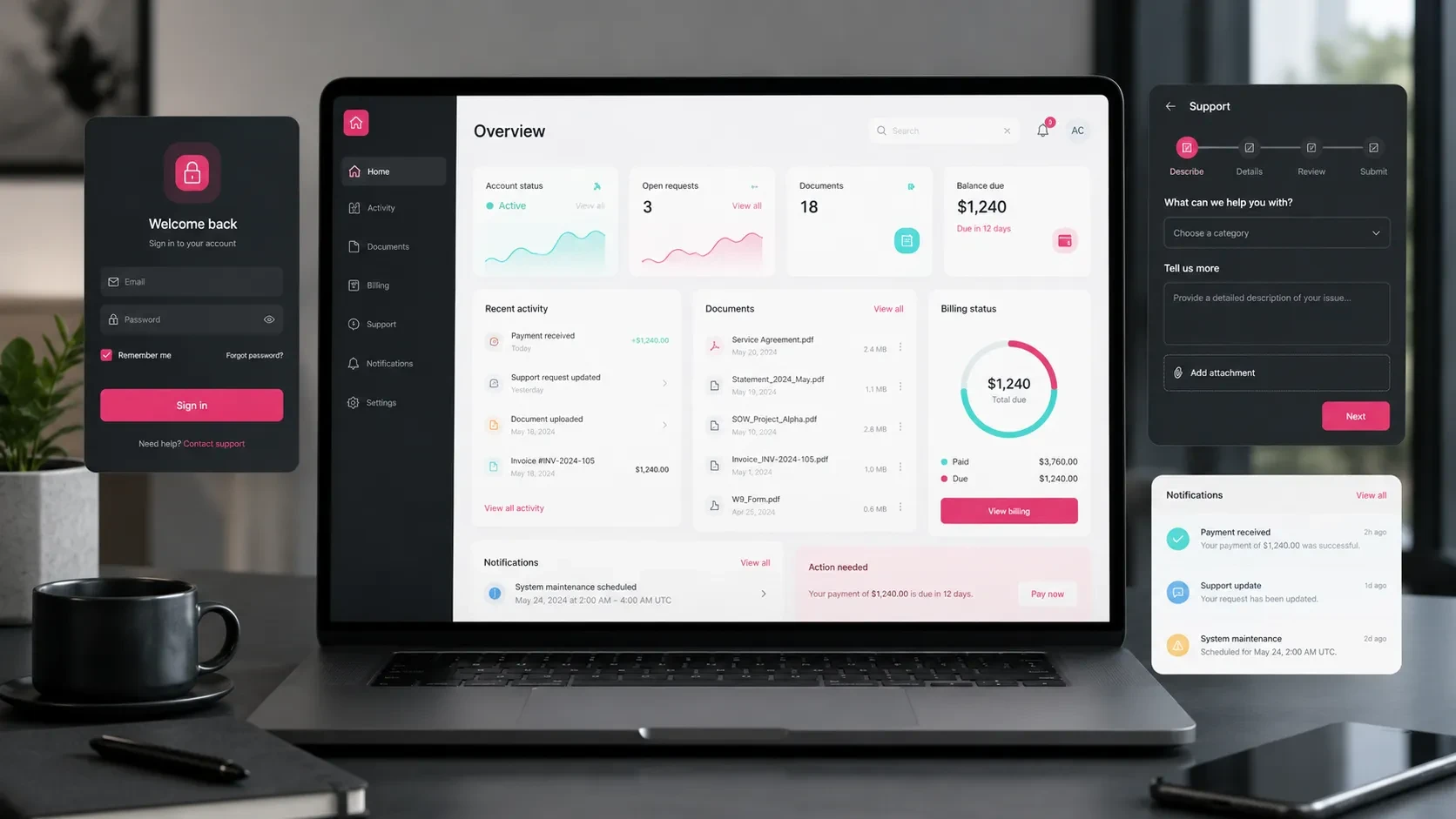
A customer portal is a web-based digital product that brings customer communication, document sharing, requests, payments, support processes, and service tracking into one central environment.
Customers can sign in to their own accounts, access information related to them, download documents, submit requests, schedule appointments, track payments, and follow ongoing processes without relying entirely on email or phone communication.
On the company side, teams can manage customer records, requests, documents, notifications, reports, and operational workflows through an admin panel.
This creates a more structured experience for customers while giving internal teams greater visibility into daily operations.
Customer portals are particularly valuable for companies that maintain ongoing relationships with their customers. Instead of spreading communication and operational records across emails, phone calls, messaging platforms, and spreadsheets, the portal creates a single place where both sides can follow the process.
Which Companies Can Benefit From a Customer Portal?
Customer portals can support many businesses that regularly exchange information with customers, manage ongoing services, or need to make operational records accessible online.
They can be particularly useful for:
Consulting companies
Educational institutions
Healthcare and clinic organizations
Logistics companies
Insurance and financial services companies
Manufacturing and supply businesses
B2B service providers
Technical service companies
Agencies and software companies
Membership-based platforms
Companies with dealer or distributor networks
The way the portal works will depend on the business model.
An educational institution might allow students to access learning materials, payment information, schedules, and announcements.
A logistics company could provide customers with shipment statuses, documents, and delivery information.
A consulting company could use the portal to share project milestones, meeting notes, reports, and files with each client.
The common goal is to create a clearer and more organized digital relationship between the company and its customers.
User Login and Account Management
User accounts form the foundation of most customer portals.
Each customer signs in to their own account and accesses only the information, documents, and processes relevant to them.
Account functionality may include:
Registration
Login
Password reset
Profile information
Company information
Authorized contact details
User roles
Notification preferences
Account settings
B2B portals may also need to support multiple users under the same company account.
For example, a customer’s finance team may need access to invoices and payment information, while the operations team works with service requests. A manager may need a broader overview of activity and reporting.
For this reason, roles and permissions should be planned from the beginning.
Clearly defining who can see which data and perform which actions creates a more secure and manageable portal structure.
Document and File Sharing
Document sharing is one of the most common functions of a customer portal.
Businesses may need to exchange:
Contracts
Proposals
Invoices
Reports
Training materials
Technical documentation
Project files
Certificates
Other customer-specific documents
A document area may include features such as:
File upload
File download
Folder structures
Customer-specific file areas
File descriptions
Version or activity history
Permission-based access
Notifications
Approval workflows
For example, a consulting company may publish monthly reports directly in the customer portal.
The customer can sign in and access only the reports associated with their account.
This reduces dependency on email attachments, keeps documents in one place, and makes previous files easier for both customers and internal teams to find.
Request and Support Management
A customer portal can also become a structured environment for managing support requests and service enquiries.
Customers can create a new request, follow its status, upload supporting files, and review responses from the company.
A request management module may include:
New request creation
Request categories
File attachments
Priority levels
Status tracking
Team responses
Notifications
Request history
Closed requests
Satisfaction feedback
This can be especially valuable for software companies, agencies, technical service providers, B2B service businesses, and organizations with recurring customer support needs.
Instead of losing context across separate emails and messages, both the customer and the team can follow the complete history of a request from one place.
Customers gain visibility into what is happening, while internal teams can organize, prioritize, and manage incoming work more effectively.
Appointment and Process Tracking
Some customer relationships include time-based processes such as appointments, meetings, sessions, maintenance visits, deliveries, or project milestones.
These can also be managed through the portal.
Relevant functionality may include:
Available date and time selection
Appointment creation
Appointment updates
Calendar view
Reminder notifications
Process stages
Completed steps
Upcoming actions
Responsible team member information
A clinic, for example, may allow patients or clients to manage appointments through their portal.
A technical service company can display scheduled maintenance dates and service statuses.
A software company can make project milestones and planned delivery dates visible to the customer.
This gives customers a clearer understanding of where they are in the process while helping internal teams make planning more visible.
Payment, Invoice, and Subscription Areas
Customer portals can also provide access to payment and billing information.
This is particularly useful for businesses with recurring services, subscriptions, memberships, retainers, or B2B payment arrangements.
The portal may display:
Payment status
Outstanding payments
Completed payments
Invoices
Subscription plans
Package information
Usage entitlements
Order history
Payment links
Automated reminders
A SaaS provider, for example, may allow customers to review their subscription plan, billing history, and account usage through the portal.
A consulting business may display service packages, payment dates, invoices, and reports within the same customer account.
Making this information accessible supports both the customer experience and the daily work of finance and operations teams.
Notifications and Customer Communication
Notifications help customers stay informed about changes that matter to them.
A notification might be triggered when:
A new document is available
A support request receives a response
An appointment is approaching
A payment is due
A project stage changes
An order status is updated
A new announcement is published
Communication channels may include:
In-portal notifications
Email
SMS
Push notifications
WhatsApp redirects or messaging flows
The right notification strategy depends on the business and the importance of each event.
Routine updates may be suitable for in-portal notifications, while time-sensitive information may also require email or SMS.
When notification scenarios are planned carefully, customers can follow their processes more easily and teams spend less time sending manual updates.
Operational Control Through an Admin Panel
A customer portal has two important sides: the experience used by the customer and the management environment used by the company.
Internal teams typically manage the customer-facing portal through an admin panel.
Depending on the product, this panel may include:
Customer management
User roles and permissions
Request management
Document management
Appointment management
Payment and invoice tracking
Announcement management
Notification management
Reporting
System settings
The admin panel becomes the operational workspace behind the portal.
Teams can manage customer accounts, update information, respond to requests, share documents, review payments, and control customer-facing processes from a central environment.
For a broader look at how this part of the system can be structured, you can read our guide on what an admin panel is and what it offers businesses.
Integrations Make a Customer Portal More Valuable
A customer portal becomes more powerful when it works together with the systems already used by the company.
Common integrations may include:
CRM
ERP
Accounting systems
Payment infrastructure
E-invoicing systems
SMS services
Email services
Calendar systems
File storage
Analytics platforms
AI services
For example, customer records can stay synchronized with the CRM.
Payment information can be connected with the accounting system.
Appointments can be synchronized with calendars, while support requests can be forwarded into internal operational tools.
Planning these integrations early helps the portal fit naturally into the company’s existing workflows.
It also reduces duplicate data entry and makes it easier for teams to work with consistent information across different systems.
How Should the Customer Portal User Experience Be Designed?
A customer portal should help users reach the information and actions they need quickly.
Adding more modules does not automatically create a better product.
If the dashboard, menu, and workflows become too crowded, customers may struggle to find even the most important actions.
Useful customer portal UX principles include:
A clear dashboard
Simple navigation
Understandable status labels
Short and structured forms
Mobile-friendly layouts
Quick-access cards
Search and filtering
A notification center
Help and support areas
Well-designed empty states
The dashboard can act as the customer’s starting point.
For example, after signing in, a user might immediately see:
Open requests
Outstanding payments
Recently shared documents
Upcoming appointments
Important notifications
Presenting key information in one place makes regular use of the portal more practical.
The experience should also prioritize the actions customers perform most frequently instead of giving every feature the same visual importance.
How Should the First Version of a Customer Portal Be Planned?
A customer portal can grow into a large product with many modules.
Trying to develop every possible feature in the first release can make the project unnecessarily complex.
A stronger approach is to identify the workflows that provide the most value to customers and internal teams and begin with those.
A first version might include:
User login
Profile area
Document sharing
Request creation
Request status tracking
Notifications
Admin panel
Basic reporting
Additional modules can then be introduced over time, such as:
Payments
Invoices
Subscriptions
Advanced reporting
Additional integrations
Automation
More complex customer roles
This allows the product to reach users earlier and gives the team an opportunity to improve future versions based on real usage and feedback.
For a broader framework for planning products like this, you can read our beginner’s guide for companies looking to build a web application.
What Does a Customer Portal Offer Companies?
A well-planned customer portal supports both customer experience and internal operations.
Bringing customer-facing processes into one environment can make communication, tracking, and reporting easier to manage.
Key benefits can include:
Centralized customer communication
More structured request and support management
Easier document sharing
Greater visibility into payments and invoices
Better appointment and process tracking
Reduced manual operational workload
A more transparent customer experience
More opportunities for data-driven improvements
A more professional B2B service experience
Stronger long-term customer relationships
The value of a customer portal therefore extends beyond the software itself.
It becomes part of how the company delivers its service.
When customers can clearly follow their information, requests, documents, payments, and next steps, the digital experience becomes more consistent and predictable.
At the same time, internal teams gain a structured environment for managing those interactions.
Codezone’s Approach
At Codezone, we plan customer portal projects around user experience, data structure, admin panel requirements, integrations, and long-term product development.
We begin by understanding how the company currently manages customer relationships, operational workflows, user roles, documents, and requests.
From there, we define the first-release scope, user journeys, backend architecture, admin panel, and integration requirements.
This creates a customer portal that customers can use comfortably, internal teams can manage efficiently, and the business can expand with new modules over time.
Conclusion
A customer portal brings account management, document sharing, requests, appointments, payment information, notifications, and operational management into one connected digital product.
For customers, this means easier access to information and greater visibility into ongoing processes.
For companies, it creates a more structured way to manage customer communication, records, and recurring operations.
When user roles, workflows, data, the admin panel, and integrations are planned together, a customer portal can become an important part of both the customer experience and the company’s service delivery model.
Frequently Asked Questions
What is a customer portal?
A customer portal is a web-based application where customers can sign in to their own accounts and access processes such as documents, requests, payments, appointments, support, and reporting.
Which companies can benefit from a customer portal?
Customer portals can be useful for B2B service providers, businesses with recurring customer relationships, companies that share documents, organizations that manage support requests, and businesses with payment, subscription, appointment, or ongoing service processes.
Which modules can be included in a customer portal?
A portal may include login and profile management, document sharing, requests, appointments, payment information, notifications, reporting, and an admin panel.
Is a customer portal usually developed together with an admin panel?
In many projects, yes. The admin panel allows the company team to manage customers, requests, documents, notifications, payments, and the processes displayed in the customer-facing portal.
Can a customer portal integrate with existing business systems?
Yes. It can be planned to work with systems such as CRM, ERP, accounting software, payment infrastructure, email, SMS, calendars, and file storage.