
Where Should Companies Start When Building a Dealer Portal?

A dealer portal helps manufacturers, distributors, and wholesalers manage dealer relationships, product catalogs, orders, pricing, documents, payments, and operational processes within one digital environment.
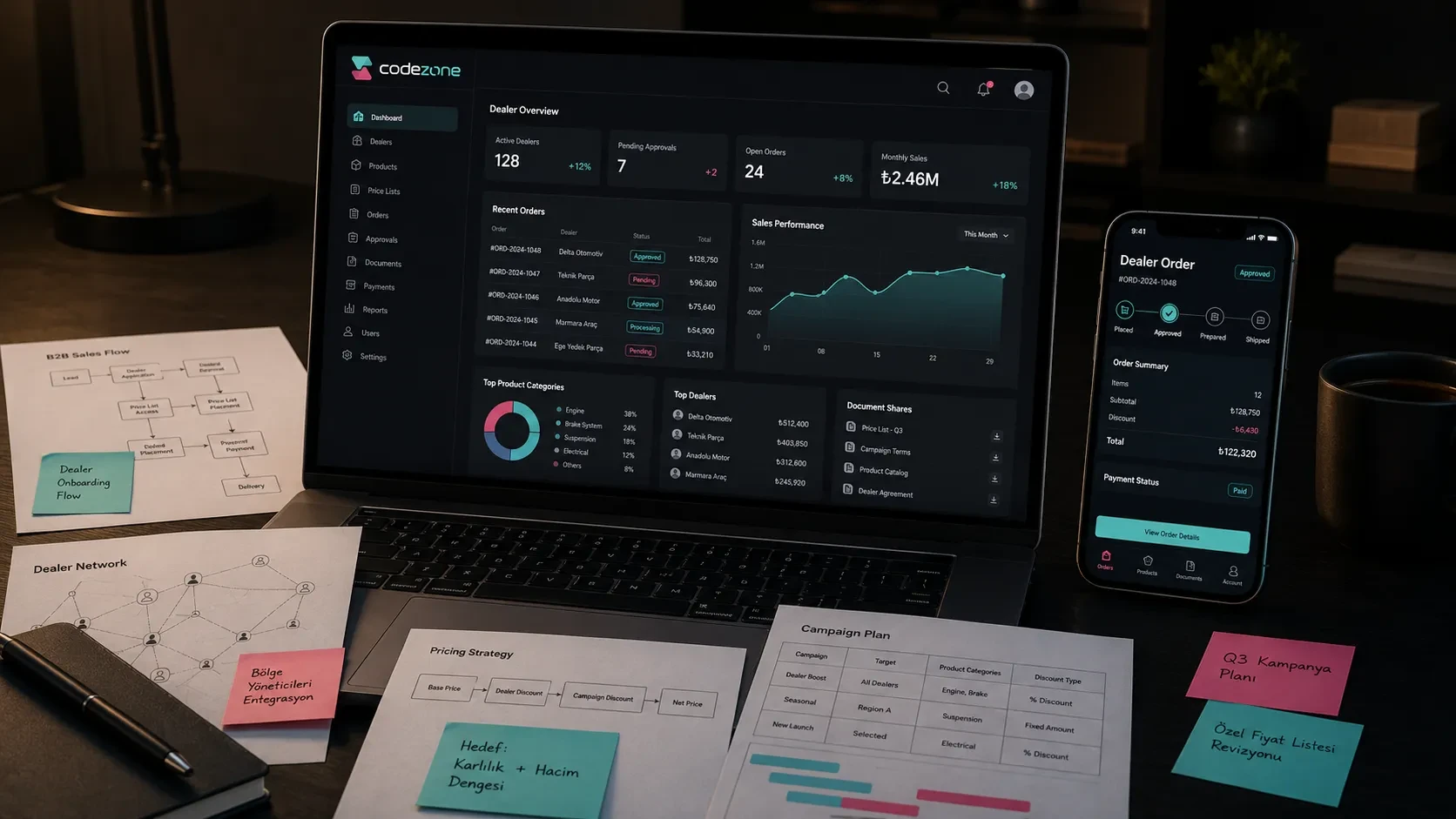
A dealer portal helps manufacturers, distributors, and wholesalers manage dealer relationships, product catalogs, orders, pricing structures, and operational processes in a more organized digital environment.
In many dealer-based businesses, sales operations initially rely on phone calls, emails, spreadsheets, WhatsApp messages, and manually tracked orders.
This structure may be manageable at a smaller scale. As the number of dealers, products, and orders increases, however, the amount of coordination required also grows.
A dealer portal brings product, pricing, order, document, payment, and communication processes into one central digital workspace.
Dealers can access their own product catalogs and price lists, create orders, download documents, and track order statuses.
For the central team, dealer accounts, orders, custom pricing, inventory information, payment status, and sales reporting become easier to monitor.
A dealer portal should therefore be planned as a digital product that supports the sales operation rather than as another page on the corporate website.
The Portal Scope Depends on the Dealer Structure
The first step in a dealer portal project is understanding how the company’s dealer network actually works.
Not every organization uses the same structure.
In some companies, all dealers have similar responsibilities and permissions. In others, regional distributors, sub-dealers, sales representatives, and the central team operate at different levels.
Questions to Answer at the Beginning
The project should clarify questions such as:
How many dealer groups are there?
Will every dealer see the same products?
Will every dealer use the same price list?
Will there be region-based permissions?
Can dealer accounts include multiple users?
Are orders placed directly or sent for approval?
Will sales representatives participate in the portal workflow?
Will dealer applications be submitted through the platform?
Once these questions are answered, the core architecture of the portal becomes clearer.
For example, a manufacturer may require a structure such as:
Central Team → Regional Distributor → Dealer
For a wholesale company, customer groups and price lists may play a more important role than regional hierarchy.
Think of the Dealer Account as a Company Account
A dealer account often represents more than a single person.
Several users may work under the same dealer organization.
For example:
A purchasing specialist may create orders.
A finance user may access invoices and payment information.
A dealer manager may monitor the complete account and order history.
For this reason, the company account structure should be defined before individual user roles and permissions are designed.
The Product Catalog Should Work According to the Dealer
The product catalog is often at the center of a dealer portal.
When a dealer signs in, they should be able to access relevant products, categories, stock information, technical details, and customer-specific prices.
A dealer catalog may include:
Product name
Product code
SKU or barcode
Category
Subcategory
Technical specifications
Product images
Stock status
Minimum order quantity
Case or package information
Delivery information
Documents
Dealer-specific price
Discount rate
A dealer catalog does not always work like a public e-commerce catalog.
Some products may only be available to selected dealers.
Prices may vary depending on dealer level.
Certain products may require minimum quantities or package-based ordering.
For a broader look at product, category, and inventory architecture, you can read our guide on how to plan inventory and order management for an e-commerce website.
Keep the Catalog Interface Simple and the Data Structure Strong
The dealer-facing interface should remain clear and easy to use.
Behind that interface, however, product data needs to be structured carefully.
Product codes, variants, inventory, prices, discounts, and document information should remain consistent.
If this underlying data becomes fragmented, everyday use of the portal becomes much more difficult for both dealers and internal teams.
The catalog experience and product data model should therefore be designed together.
Pricing and Discount Logic Should Be Defined From the Beginning
Pricing is one of the most sensitive areas of a dealer portal.
In B2B sales, showing the same price to every customer is often not appropriate.
Prices may depend on:
Dealer group
Individual product agreement
Product category
Purchase quantity
Package or case quantity
Region
Campaign period
Current commercial agreement
Quote process
Possible Pricing Models
The portal may need to support:
Dealer-group pricing
Product-specific custom prices
Category-based discounts
Quantity discounts
Package-based pricing
Region-based pricing
Campaign pricing
Contract-based pricing
Quote-based pricing
This structure should be defined at the beginning of the project.
Pricing affects much more than the number displayed on the product page.
It influences the cart, orders, payment flows, invoicing, admin panel, and ERP integrations.
In B2B systems, price is therefore not simply product information. It is one of the core data points representing the commercial relationship with each customer.
For a more comprehensive look at dealer pricing and B2B order architecture, you can read our guide on how to plan a B2B e-commerce website.
The Order Flow Should Match the Real Sales Process
Orders in a dealer portal do not always follow a standard “add to cart, pay, and place order” flow.
The actual process may vary depending on how the sales team operates.
For example:
A dealer may submit an order request for approval.
The central team may need to confirm the order.
A sales representative may participate in the approval process.
Certain products may require a quotation.
Some customers may order using an account balance or deferred payment terms.
Possible Order Models
A dealer portal may support:
Direct orders
Order requests
Quote requests
Approval-based orders
Sales representative approval
Bulk orders
Excel order uploads
Repeat orders
Minimum-order-value rules
Minimum-quantity rules
The portal becomes more valuable when it reflects the company’s existing sales workflow.
If every order currently requires central approval, the digital product should support that process.
If a dealer already has agreed pricing and can place orders directly, the workflow can be designed for faster purchasing.
Order Status Should Be Visible to the Dealer
After submitting an order, dealers should be able to understand what stage the process has reached.
The status flow may include:
Request received
Under review
Approved
Preparing
Ready for shipment
Shipped
Delivered
Cancelled
Return initiated
These statuses should remain consistent across the dealer interface, admin panel, and notification flows.
The dealer should not need to call the sales team simply to find out whether an order has been approved or shipped.
Documents, Invoices, and Payment Information Should Be Centralized
Dealer relationships involve more than orders.
Companies also exchange financial records, documents, product files, and commercial information with their dealers.
A dealer portal can centralize information such as:
Invoices
Delivery notes
Product catalogs
Technical documents
Warranty documents
Price lists
Contracts
Campaign announcements
Account statements
Payment status
Payment terms
Order history
This creates another reason for dealers to use the portal regularly.
They do not need to visit only when placing a new order.
The portal also becomes the central place where they can access current commercial and operational information.
This model is closely related to the broader customer portal experience. You can explore that perspective in our guide on what a customer portal is and how companies can use it.
The Admin Panel Is the Central Team’s Control Environment
The dealer-facing side of the portal is only one part of the product.
The central team also needs an effective management environment.
The admin panel is where dealer accounts, orders, price lists, products, documents, announcements, payments, and reports can be managed.
Possible modules include:
Dealer list
Dealer detail pages
User and role management
Product management
Category management
Price lists
Discount rules
Order management
Quote requests
Document management
Announcement management
Payment and account information
Reporting
Integration settings
The Panel Should Use the Language of the Team
The admin panel should not feel like a technical interface designed only for developers.
Sales, operations, finance, and management teams may use it every day.
Status names, filters, reports, and actions should therefore reflect the terminology already used within the company.
If order statuses, dealer levels, price lists, and reports follow familiar business logic, teams can adopt the portal more easily.
For a more detailed look at admin panel architecture, you can read our guide on which modules should be planned when building an admin panel.
Integrations Connect the Portal With Existing Business Systems
A dealer portal often needs to work together with software the company already uses.
Product, inventory, pricing, account, order, invoice, and customer information may come from systems such as ERP, CRM, accounting, or warehouse software.
Common integrations may include:
ERP
CRM
Accounting systems
E-invoicing
Inventory management
Shipping providers
Payment infrastructure
SMS and email services
File storage
Analytics tools
One of the most important integration decisions is determining the primary source of each type of data.
For example:
Does product information come from the ERP or the portal?
Are price lists managed in the ERP or accounting software?
Are orders transferred from the portal to the ERP?
Where does the dealer’s account balance come from?
Which system owns customer information?
Once these responsibilities are clear, the portal can operate with more consistent data flows.
Teams can work with connected systems rather than entering the same information manually across several platforms.
For a broader look at integration architecture, you can read our guide on what API integration is and what it offers companies.
The First Release Should Reflect Real Dealer Usage
It can be tempting to include every possible module in the first release of a dealer portal.
A more practical starting point is to prioritize the areas dealers and central teams will use regularly from the first day.
A Strong First Release May Include
Dealer login
Dealer account and user roles
Product catalog
Dealer-specific pricing
Order or quote requests
Order status tracking
Document sharing
Announcements
Basic admin panel
Basic reporting
Later phases can introduce:
Advanced reporting
Detailed account statements
Deeper ERP synchronization
Campaign management
Sales representative interfaces
Mobile applications
Automated notifications
More advanced pricing rules
The goal of the first release is to make the portal genuinely usable and begin observing real dealer behavior.
Which products do dealers view?
Which documents do they download?
Which ordering flow do they prefer?
Which information do they frequently search for?
Real usage data provides a stronger basis for deciding what should be developed next.
Codezone’s Approach
At Codezone, the main goal of a dealer portal project is to move the sales and operational relationship between the dealer network and central team into a more organized digital structure.
For this reason, we begin by understanding how the dealer network works and how an order moves through the company rather than starting only with a list of screens.
Dealer types, pricing logic, product catalog structure, order approvals, document sharing, payment information, and team roles are defined within the same workflow.
The dealer-facing portal, admin panel, data model, and integration architecture are then structured around these requirements.
This approach creates a digital workspace where dealers can access the information they need more easily, central teams can manage sales operations more effectively, and the company can make dealer relationships more visible and measurable.
Conclusion
For companies planning a dealer portal, the first step is understanding the existing dealer structure and sales operation.
Dealer types, product catalogs, custom pricing, order workflows, documents, payment information, the admin panel, and integrations should all be evaluated as parts of the same system.
A well-planned dealer portal creates a more organized relationship between dealers and the central team.
Dealers gain easier access to products, prices, documents, and order statuses.
Company teams can manage orders, dealer accounts, price lists, and operational data from one central environment.
For manufacturers, distributors, wholesalers, importers, and other companies operating through B2B dealer networks, a dealer portal can become a strong digital infrastructure for making sales operations more visible, manageable, and scalable.
Frequently Asked Questions
What is a dealer portal?
A dealer portal is a web-based platform where companies manage product catalogs, price lists, orders, documents, payments, announcements, and reporting processes with their dealers.
Which companies can benefit from a dealer portal?
Dealer portals are suitable for manufacturers, distributors, wholesalers, importers, and other B2B companies operating through dealer networks. They are particularly valuable when the business manages a large number of dealers, products, and orders.
Which modules can be included in a dealer portal?
A dealer portal can include dealer login, product catalogs, custom pricing, order or quote requests, document sharing, announcements, payment information, an admin panel, reporting, and integrations.
Can a dealer portal integrate with an ERP system?
Yes. Product, inventory, pricing, order, invoice, account, and customer information can be planned to work together with ERP or accounting systems through integrations.
Are a dealer portal and a B2B e-commerce website the same thing?
They may share several similar features.
B2B e-commerce generally focuses more directly on digital sales and ordering, while a dealer portal can provide a broader environment that also includes dealer relationships, document sharing, announcements, price lists, financial information, and operational tracking.