
Why Does a Mobile App Need an Admin Panel?

An admin panel allows teams to manage users, content, notifications, orders, appointments, reports, and operational processes behind a mobile application from one central workspace.
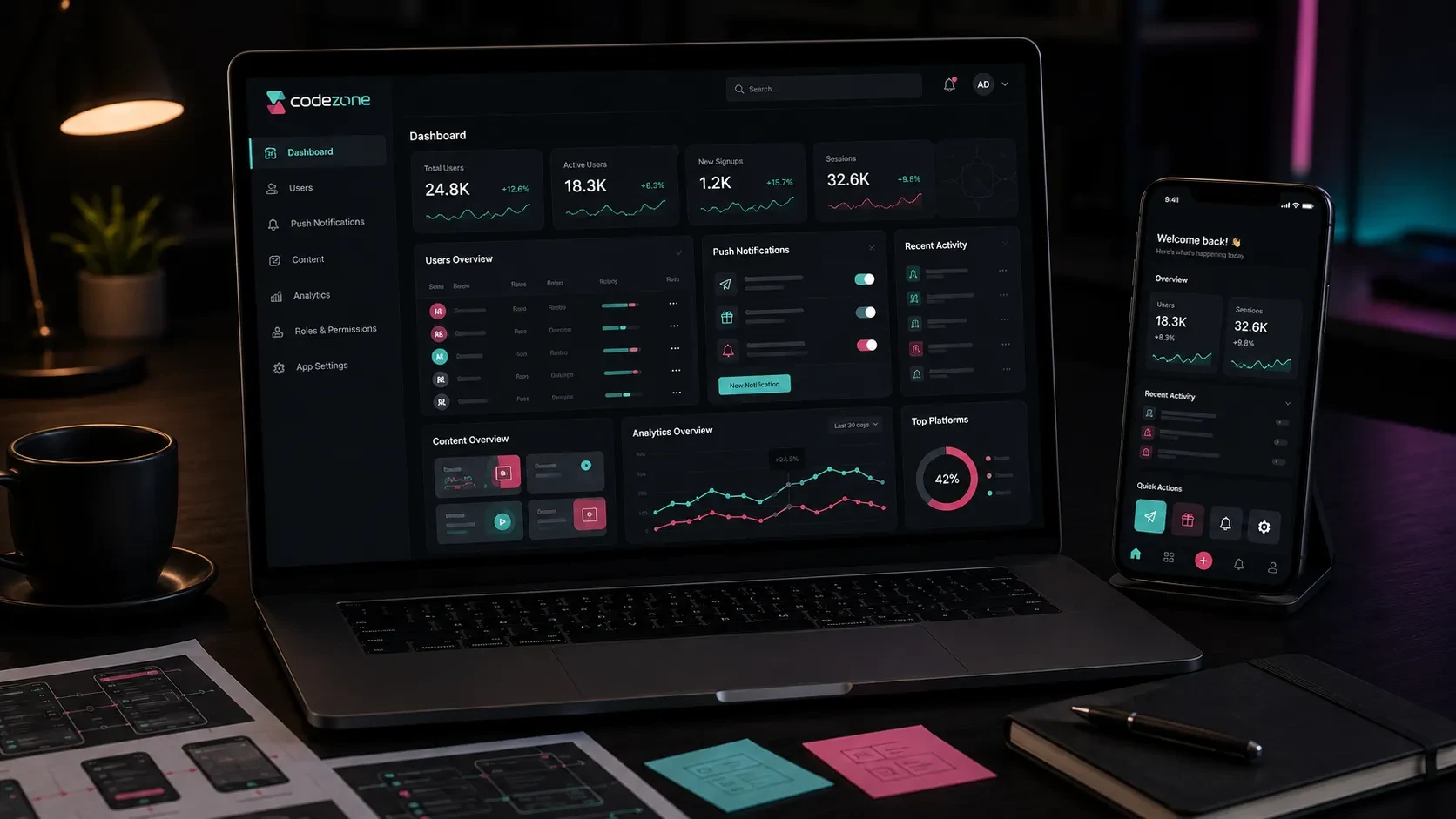
A mobile application is designed around the experience users see on their phones, but managing the product usually requires another interface behind the scenes.
Users may create accounts, access content, place orders, book appointments, submit applications, make payments, or receive notifications. The company team needs a practical way to manage all of these processes.
This is where the admin panel becomes an important part of the mobile product.
Through a web-based admin panel, authorized team members can manage users, content, orders, reservations, applications, notifications, reports, and system settings without working directly with the application code.
A well-planned admin panel therefore supports more than technical administration. It becomes the operational workspace behind the mobile application.
User Management Can Be Centralized
Applications with membership systems generate user records continuously.
The company may need to review these accounts, understand user activity, update account statuses, or support customers when they experience an issue.
A user management module can include:
User list
User detail pages
Profile information
Registration date
Verification status
Account status
User roles
Subscription or package information
Notification preferences
Activity history
Internal notes and tags
For example, a customer support representative may need to find a user and review their account before responding to a request.
An operations team may need to see whether the user has an active membership, completed verification, or performed a particular transaction.
When this information is available through one structured interface, teams can manage user-related processes more efficiently.
For a deeper look at the customer-facing side of this structure, you can read our guide on how to plan sign-up and login in a mobile app.
App Content Can Be Updated Without Releasing a New Version
Many mobile applications contain dynamic content.
This may include:
Banners
Announcements
Campaigns
Articles
Lessons
Product information
Service descriptions
Help content
Frequently asked questions
Promotional areas
When this content is connected to the backend and admin panel, authorized users can update it without requiring a new App Store or Google Play release for every change.
For example, an education application may allow the team to add new lessons and announcements through the panel.
A retail application may allow campaign banners and promotional content to be updated.
A service application may allow descriptions, locations, or available services to be managed dynamically.
This gives the company more control over the product after launch and reduces dependency on the development team for routine content updates.
Orders, Reservations, and Applications Can Be Managed From One Place
Many mobile applications support a business process beyond simple content consumption.
Users may:
Place orders
Make reservations
Book appointments
Submit applications
Request services
Upload documents
Create support requests
These actions need an operational environment on the company side.
The admin panel may allow teams to:
View new transactions
Update statuses
Assign requests to team members
Add internal notes
Review customer information
Manage cancellations
Track payment status
Review activity history
For example, in an appointment application, the mobile user selects a service, date, and time.
The company team can then see the appointment in the admin panel, update its status, assign the relevant employee, and follow the complete appointment history.
In an e-commerce mobile application, the same structure can be used for orders, payments, shipping, cancellations, and returns.
The mobile application and admin panel serve different users, but both work with the same underlying business process.
Notifications Can Be Managed Through the Admin Panel
Push notifications are one of the most important communication channels available to mobile applications.
A management interface can make notification operations easier for marketing, content, support, or operations teams.
The panel may allow teams to:
Create notification content
Select user groups
Send notifications immediately
Schedule notifications
Review notification history
Manage notification templates
Monitor delivery or interaction data
Possible notification scenarios include:
Campaign announcements
New content
Appointment reminders
Order updates
Shipping information
Application status updates
Subscription reminders
Personalized messages
The system can also support segmentation.
Instead of sending the same message to every user, notifications may be directed according to account type, location, membership plan, purchase history, interests, or previous activity.
This creates a more controlled communication structure and allows the internal team to manage mobile engagement without making every campaign a development task.
User Roles and Permissions Protect Operational Access
The admin panel itself may be used by several different teams.
Not every employee should necessarily have access to every module or action.
Possible panel roles may include:
Super Admin
Operations
Customer Support
Content Editor
Marketing
Finance
Report Viewer
Each role can be given access according to its responsibilities.
For example, a content editor may manage articles and banners without accessing payment information.
A finance user may review transactions and subscriptions without being able to modify app content.
Customer support may need user and order information while having limited access to system settings.
Role-based permissions make the panel easier to manage as the team grows and help protect sensitive information.
Activity history can also record important actions such as:
Who changed a user’s status?
Who published a campaign?
Who cancelled an order?
Who changed a role?
Who exported data?
These records create greater visibility across daily operations.
Reports Make Product Activity Easier to Understand
A mobile application generates valuable information after launch.
Some of this data can be presented directly in the admin panel so teams can monitor product and business activity without moving between multiple systems.
Depending on the application, dashboards and reports may include:
Total users
New registrations
Active users
Orders
Reservations
Applications
Revenue
Subscriptions
Notification interactions
Most-used features
Operational statuses
Support requests
The dashboard should focus on information that helps teams make decisions.
For example, an appointment platform may prioritize upcoming appointments and cancellations.
An e-commerce application may focus on orders, revenue, payments, and fulfillment.
A subscription product may highlight active plans, renewals, cancellations, and payment failures.
For a broader look at which metrics can guide product development after launch, you can read our guide on which metrics should be tracked after launching a mobile app.
The Admin Panel Works Together With the Backend
The mobile application and the admin panel generally work with the same backend infrastructure.
The backend manages the business logic and data flow between the two interfaces.
For example:
A user updates their profile in the mobile app.
The data is sent to the backend.
The database is updated.
The new information becomes visible in the admin panel.
The flow can also work in the opposite direction:
An administrator updates an order status in the panel.
The backend saves the change.
The mobile application receives the updated status.
A notification can be sent to the customer.
This shared infrastructure keeps information consistent across the product.
It also allows mobile screens, admin operations, notifications, reporting, and external integrations to work around the same data model.
For a more detailed explanation of this technical layer, you can read our guide on why a mobile app needs a backend.
Integrations Can Be Managed More Clearly
Mobile applications may need to work with external business systems such as:
CRM
ERP
Payment providers
Accounting software
Shipping providers
SMS services
Email services
Calendar systems
Maps
File storage
Analytics platforms
The admin panel can provide visibility into these integrations and the data they generate.
For example, an order may originate in the mobile application, be processed by the backend, sent to the ERP, and then receive shipping information from another service.
The internal team may need to see whether these steps completed successfully.
Depending on the project, the panel may display:
Integration status
External transaction IDs
Synchronization information
Payment results
Shipping information
Error records
Retry actions
This becomes particularly valuable when several systems participate in the same workflow.
For a broader explanation of connected software systems, you can read our guide on what API integration is and what it offers companies.
The Admin Panel Should Be Planned From the Beginning
A common mistake is to design the mobile application first and consider the admin panel only after development has already started.
However, many mobile features create corresponding operational requirements.
If users can create appointments, someone needs to manage those appointments.
If users can upload documents, the team may need to review those documents.
If users can place orders, operations need an order-management environment.
If campaigns can be shown in the application, someone needs a way to create and publish them.
For this reason, mobile and admin requirements should be defined together.
During the first planning stage, questions may include:
Which user types will exist?
Which data will the app generate?
Which information does the company need to manage?
Which actions should be available in the panel?
Who will use the panel?
Which permissions will each team need?
Which reports are required?
Which integrations will be connected?
Which notifications will be managed?
What needs to be included in the first release?
These answers directly influence backend architecture, data models, project scope, development time, and cost.
The First Version Does Not Need Every Possible Module
An admin panel can eventually become a comprehensive operational platform.
That does not mean every module needs to be included in the first version.
The initial scope should focus on the actions the company needs from the first day the mobile application goes live.
A first release may include:
User management
Content management
Order, appointment, or application management
Notification management
Basic roles and permissions
Dashboard
Basic reporting
System settings
Later versions may introduce:
Advanced reporting
Automation
Additional integrations
Customer segmentation
Advanced permission structures
Bulk operations
Data exports
AI-assisted workflows
This creates a more controlled product-development process.
Real usage can then show which admin features actually create operational value.
For a broader look at admin architecture, you can read our guide on which modules should be planned when building an admin panel.
Codezone’s Approach
At Codezone, we plan the mobile application, backend, admin panel, data structure, integrations, and publishing process as connected parts of the same digital product.
We begin by understanding the application’s purpose, user roles, primary workflows, and the daily operations the company needs to manage.
From there, we define which actions take place in the mobile application, which processes are managed through the admin panel, how data moves through the backend, and which external systems need to be connected.
This approach creates mobile products that provide a clear experience for users while giving internal teams a practical environment for managing day-to-day operations.
Conclusion
An admin panel gives companies control over the operational side of a mobile application.
Users, content, notifications, orders, appointments, applications, permissions, and reports can all be managed through a central environment.
When the mobile application, backend, and admin panel are planned together, data can move more consistently between user actions and internal operations.
The result is a product that is easier for users to interact with, easier for teams to manage, and better prepared for future development.
Frequently Asked Questions
Does every mobile app need an admin panel?
Not every mobile application needs one. Static or very simple applications may operate without a dedicated admin panel. When users, content, orders, appointments, applications, notifications, or other dynamic data need to be managed, an admin panel becomes particularly useful.
What can be managed through a mobile app admin panel?
Depending on the product, teams can manage users, content, orders, appointments, applications, campaigns, notifications, permissions, reports, and system settings.
Is the admin panel part of the mobile application?
The admin panel is usually a separate web-based interface for company teams, but it works with the mobile application through the same backend and data infrastructure.
Can push notifications be sent through the admin panel?
Yes. The panel can be designed to create, schedule, segment, and review push notifications according to the application’s communication requirements.
Does an admin panel increase mobile app development scope?
Yes. The number of modules, user roles, workflows, reporting requirements, integrations, and permission rules all influence the scope of the admin panel and therefore the overall project.